


NightTalk Pro
3.111.00 Reviews
App Specs
- Version
- 1.49.0
- Updated On
- License
- Free
- Downloads
- 50,000+
- Developer
- maab faisal
- Categories
- Communication
- Platform
- Android
Screenshots

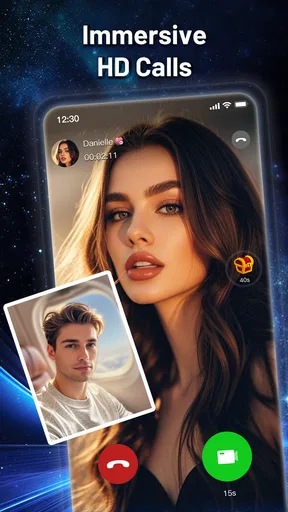


 Analysis by AppCompare
I approached NightTalk Pro as a communication app rather than just another place to start a video call. Its focus is live video chat, but the more important question is how that format fits into real conversations: when you want immediate contact, how much attention you can give, and whether the exchange feels easy to leave when your time or comfort runs out. After spending time with it, I see a service aimed at people who prefer a direct, face-to-face rhythm instead of long message threads.
The app is free to install, carries a Mature 17+ age rating, and is published by maab faisal. It belongs to the communication category, where it sits beside familiar messaging and video-call tools but takes a more spontaneous route. The store summary is “Live Video Chat,” while the short description presents it as NightTalk Pro. That combination makes the purpose clear, although it also means the app is best judged by the quality and comfort of its live interactions rather than by a large collection of productivity features.
How NightTalk Pro fits into everyday communication
I find the most useful way to think about NightTalk Pro is as a deliberate switch from messages you can answer later to a conversation that asks for your attention now. That distinction helps me decide when its live-video focus fits my day and when a text or voice call would be kinder to both people. Next, I’ll look at how that choice changes the feel and pace of an ordinary exchange.
When a live conversation makes more sense than texting
Texting is efficient, but it can also stretch a simple exchange across an entire evening. A question receives a delayed reply, the tone is misread, and a small misunderstanding grows because neither person can hear the other’s voice or see their expression. A live video chat changes that rhythm immediately. I found the appeal strongest when the goal was presence rather than documentation: checking in with someone, having a more personal conversation, or replacing a scattered message exchange with one focused interaction.
That immediacy is also the app’s main commitment. NightTalk Pro is not the choice I would make when I need a searchable work history, carefully organized group collaboration, or a quiet channel for sending files. It is more suitable when a conversation benefits from being experienced in the moment. If you already know that your contacts prefer short written messages, moving them into live video may feel like adding pressure rather than improving communication.
A realistic example is a late-evening catch-up with a friend who has had a difficult day. In a standard chat, I might send several questions and wait for fragments of an answer. With a live video format, the conversation can become more natural: pauses are visible, reactions are immediate, and the exchange can end once both people feel heard. The trade-off is that both participants need to be available at the same time, which makes the app less flexible than ordinary messaging.
The first important decision is whether you want spontaneity
Before opening a live chat, I would decide what kind of contact I am actually seeking. If I want a quick answer, text is usually faster. If I want emotional nuance, live video has an advantage. If I am tired, distracted, or in a noisy place, the same immediacy can become a burden. This sounds obvious, but it is easy to open a video-focused app simply because it is available and then discover that the required attention does not match the moment.
Worth Reading Before You Choose

Flipboard Shows What News Apps Must Do Beyond the Feed

Switching to Android Auto Means Rethinking Your Driving Routine

Google Calendar Makes a Crowded Week Easier to Manage

Ludo King Makes the Most of the Minutes Between Plans

Baby Panda World Brings Quick Play to Modern Phones, but Its Game Library Feels Busy

ESPN’s Live Game View Makes Following Close Games Easier
That is where the app’s communication style differs from a conventional messenger. A messenger lets me compose, revise, postpone, and answer at my own pace. NightTalk Pro encourages a more present exchange. That can make conversations warmer, but it can also expose differences in availability. One person may see a live invitation as friendly and casual, while another experiences it as an interruption that demands an instant response.
What the current release tells me about the experience
The current version is 1.49.0, and the app supports devices running Android 7.0 or later. That gives it a relatively broad reach for people using older compatible phones, though the practical experience will still depend on the handset, camera, microphone, connection, and surroundings. I would not treat the minimum operating-system requirement as a promise of identical performance across every supported device. Live video is sensitive to conditions that ordinary text chat can easily ignore.
The app has passed the early discovery stage rather than being an unknown experiment. It has more than 50 thousand installs, an average rating of 3.1 from 126 ratings, and 11 written reviews. I read that overall picture as mixed but useful: enough people have tried it to make the app worth considering, while the rating suggests that expectations should remain realistic. I would test it with low-stakes conversations first instead of immediately making it my only communication tool.
Conversation flow: the value of fewer layers
The best part of live video chat is the reduction in conversational layers. I do not have to guess whether a short reply sounds annoyed, wait for a reaction, or build a complete explanation through separate messages. Seeing and hearing another person can make a simple exchange feel more complete. This is especially helpful for conversations where tone matters, such as resolving a misunderstanding or offering reassurance.
However, fewer layers also means fewer protective pauses. In text, I can stop and think before answering. In a live exchange, silence may feel meaningful even when I am only choosing my words. Someone who is naturally reflective may find the pace uncomfortable. For that reason, I would use NightTalk Pro with people who understand that a pause is not automatically a problem. The app can support clarity, but the participants still control whether the conversation becomes considerate or rushed.
One practical habit improved my experience: I treated the opening moments as a check-in rather than jumping straight into a serious subject. A quick confirmation that both people could talk comfortably made the rest of the conversation smoother. This is a small workflow, but it matters in a format where a bad start can make the entire interaction feel intrusive. It also helps avoid spending the first part of a call discovering that one person is busy, uncomfortable, or unable to focus.
Attention is the hidden cost of live contact
Video communication asks for more than a notification tap. I have to look at the screen, listen carefully, respond in real time, and remain aware of how I appear. That can be rewarding when I am intentionally making space for someone, but it is tiring when I am multitasking. NightTalk Pro therefore changes not only how quickly people communicate, but also how much attention each exchange consumes.
I would avoid opening a live conversation while cooking, commuting, working, or handling anything that depends on concentration. The problem is not just distraction. Divided attention makes the other person feel ignored, and the visual format makes that lack of focus more noticeable. A short, fully present conversation is often better than a longer call where one participant keeps looking away.
This is also why the app may feel more demanding than a standard voice call. Video adds visual information, but it adds self-awareness as well. Some users will appreciate the closeness; others will prefer audio because they can move around, take notes, or speak without worrying about their appearance. If your main goal is efficient communication, a conventional messenger or voice service may be the better fit.
A useful rhythm for short, intentional chats
I found the service easier to evaluate when I gave each conversation a clear purpose. A brief check-in, a personal catch-up, or a direct discussion works better than opening a live session with no idea whether I have time to stay. This does not mean every call needs a formal agenda. It simply prevents the app from turning into an open-ended demand on attention.
Another useful habit is to agree on the timing before expecting a live response. Sending a message first through another channel may seem less spontaneous, but it respects the other person’s schedule. NightTalk Pro is at its best when both sides choose the live moment. It is less comfortable when one person treats availability as automatic.
For users who enjoy meeting people through live video, this point becomes even more important. A spontaneous conversation can be pleasant, but the lack of preparation also makes it harder to judge whether the interaction is appropriate. I would keep personal details limited until trust has developed, avoid showing private surroundings unnecessarily, and end the exchange as soon as it stops feeling comfortable. Those are sensible boundaries for any live communication service, and they matter more when the format is immediate.
Boundaries should be part of the setup, not an afterthought
The Mature 17+ rating is an important signal about the intended audience. I would not treat it as a guarantee that every conversation will suit every adult, nor would I recommend the app to younger users. Anyone considering it should be comfortable managing direct social contact and deciding what they are willing to share on camera. Parents and guardians should also take the age guidance seriously rather than assuming that a communication label makes the environment suitable for children.
My strongest advice is to decide in advance what a comfortable conversation looks like. That can include choosing a private but not overly revealing background, keeping identifying information out of the first interaction, and remembering that ending a call does not require a long explanation. A communication app should make contact possible, not make users feel trapped in it.
I would also avoid treating a friendly visual exchange as proof of trust. Video can create a strong feeling of familiarity very quickly, but that feeling may move faster than the relationship itself. Keeping the first conversations light and limiting sensitive information is a practical way to preserve control. If someone pushes past a clear boundary, the right response is to leave rather than negotiate endlessly.
Free access, with a cost decision to make
NightTalk Pro is free to use in the sense that it has no purchase price for installation, but it includes in-app purchases ranging from $0.99 to $199.99 per item. That is a wide span, so I would pay close attention to every purchase screen and avoid assuming that a free download means every part of the experience will remain cost-free. Anyone trying the app should decide on a spending limit before exploring optional paid elements.
This pricing structure affects who I would recommend it to. A casual user who only wants to test live video can begin without paying, which lowers the barrier to trying the communication style. Someone who is easily drawn into repeated small purchases should be more cautious. I would use the free experience first, consider whether it genuinely improves my conversations, and only then decide whether any optional spending is justified.
The most sensible comparison is not simply “free versus paid.” It is whether the app offers something I cannot already get from the usual video and messaging tools I use. Established alternatives may be preferable when I need dependable contact with known people, richer controls, group coordination, or a communication history. NightTalk Pro makes more sense when the live, direct rhythm is the feature I value most and I am willing to manage the attention and boundary costs that come with it.
Who should try it, and who should skip it
I would recommend giving it a careful try if you prefer face-to-face interaction, want to replace drawn-out text conversations, and can choose specific times for live contact. It may also suit someone who finds that voice and video communicate warmth more effectively than typed messages. The app’s strongest use case is not constant availability; it is a deliberate shift from asynchronous conversation to immediate presence.
I would skip it if you need a low-pressure way to answer later, dislike being on camera, or expect a communication tool to organize work, files, and long-running group discussions. I would also avoid making it the first choice for sensitive conversations with people I do not know well. The live format can feel personal before genuine trust exists, and that is precisely when restraint matters.
Compared with ordinary messaging, the app is more expressive but less forgiving of interruptions. Compared with voice calls, it offers visual context but demands more attention. Compared with established video platforms, its appeal is its narrow focus on live chat rather than a broad set of collaboration functions. None of those differences makes it universally better. They simply make the choice clearer: use it when immediacy is the point, not when flexibility is.
My social verdict after weighing the trade-offs
My overall view is cautiously positive. NightTalk Pro understands a real communication need: sometimes people do not want another chain of short messages; they want a present conversation that feels closer to being in the same room. The app’s live-video identity gives it a clear purpose, and the free entry point makes it easy to test without committing immediately.
At the same time, I would not recommend using it on autopilot. Its format consumes attention, makes availability feel more immediate, and can blur the line between a casual invitation and an unwanted interruption. The Mature 17+ rating, the mixed 3.1 average, and the optional purchase range all reinforce my advice to approach it deliberately. Start with a simple conversation, protect personal information, and decide whether the rhythm genuinely suits you before spending money or relying on it heavily.
The real strength of NightTalk Pro is not that it replaces every messenger; it is that it makes live presence the center of communication. For the right user, that can make conversations clearer, warmer, and less fragmented. For someone who values control over timing, privacy, or attention above all else, a familiar text, voice, or established video service will probably be the wiser choice. I would keep this app as a focused option for intentional live contact, not as my universal communication home.
Pros
- Private
- low-pressure chats make it easier to open up at night.
- Simple interface keeps conversations focused and easy to follow.
- Useful for meeting people outside your usual social circle.
- Night-focused atmosphere gives the app a distinctive identity.
- Can provide company when friends or family are unavailable.
Cons
- The smaller user base may limit matching and conversation options.
- Some conversations may be inactive during daytime hours.
- Anonymous interactions can sometimes lead to unreliable profiles.
- Privacy settings should be checked carefully before sharing personal details.
- The experience may feel repetitive without enough active participants.
FAQs for NightTalk Pro
What is NightTalk Pro and what can I use it for?
NightTalk Pro is presented as a communication-focused app designed for private conversations and social interaction, especially during evening or nighttime use. Depending on the version available in your region, it may include messaging, voice or video features, user profiles, and conversation tools. Before downloading, check the official store description to confirm which functions are currently supported on your device and in your country.
Is NightTalk Pro free to download and use?
NightTalk Pro may be available as a free download, but some features can require in-app purchases, a subscription, or a premium upgrade. Users should review the pricing section in Google Play or the App Store before creating an account. Also check whether subscriptions renew automatically, what trial terms apply, and whether essential communication features are limited in the free version.
Does NightTalk Pro protect my privacy and personal information?
Privacy is particularly important for any app involving conversations, profiles, contacts, or shared media. Before using NightTalk Pro, read its privacy policy and review the permissions requested during installation. Pay attention to access involving the microphone, camera, contacts, location, notifications, and storage. Avoid sharing sensitive information until you understand how data is collected, stored, used, and deleted.
What devices and permissions are required to run NightTalk Pro?
NightTalk Pro should be installed only on a compatible Android or iOS device that meets the operating-system requirements listed on its official store page. A stable internet connection may be necessary for account access and real-time communication. Depending on the features you use, the app may request microphone, camera, notification, contact, or storage permissions, which you can review and manage in your device settings.
Is NightTalk Pro safe and suitable for everyone?
NightTalk Pro should be used responsibly, particularly if it allows interaction with people you do not know. Review the app’s age rating, reporting tools, blocking options, and community guidelines before joining conversations. Do not send passwords, financial details, exact location information, or private images to strangers. Parents and guardians should also check whether the app’s features and social environment are appropriate for younger users.


